Documentation
A snappy, native git GUI - GPU-rendered, configured in Lua. One window, a tab per repo:
the history as a commit graph, the working tree with its diffs, and the everyday actions a
click away. This page walks through the window and lists every init.lua option,
keybinding and theme colour.
full example config →
every setting, in one commented init.lua
01Install & first launch
Download the installer from the home page and run it. Windows is available now; macOS and Linux are on the way.
On first launch the window asks you to open a folder - pick a repo with
Ctrl+O or the + in the title bar and it opens in a tab.
ibidem is single-instance: launching it again with a folder opens that repo in a
tab of the running window and raises it. The window's position and size, your open tabs, column
widths and sidebar layout are all remembered for next launch.
The window idles at 0% CPU and wakes on input. All git work runs on a background thread and reports back, so nothing ever holds up the UI.
git already
installed on your system. Outside a repo, or with no git on your PATH,
the window says so rather than failing.02The title bar & tabs

+ opens another. On the right, the logo opens the config editor, then minimize / maximize / close.- Click a tab to show it. Its
✕, a middle-click, or Ctrl+W closes it; Ctrl+Tab / Ctrl+Shift+Tab step through them. - Drag a tab left or right to reorder it. When there are more than fit, a thin scrollbar appears under them - drag it, or scroll the wheel over the tabs.
+(or Ctrl+O) opens a folder in a new tab, or switches to its tab if it's already open.- Each tab keeps its own view - scroll, selection, even a half-written commit message - and an action started in one finishes even if you've moved on.
Drag the empty title bar to move the window, and any edge to resize it.
03History
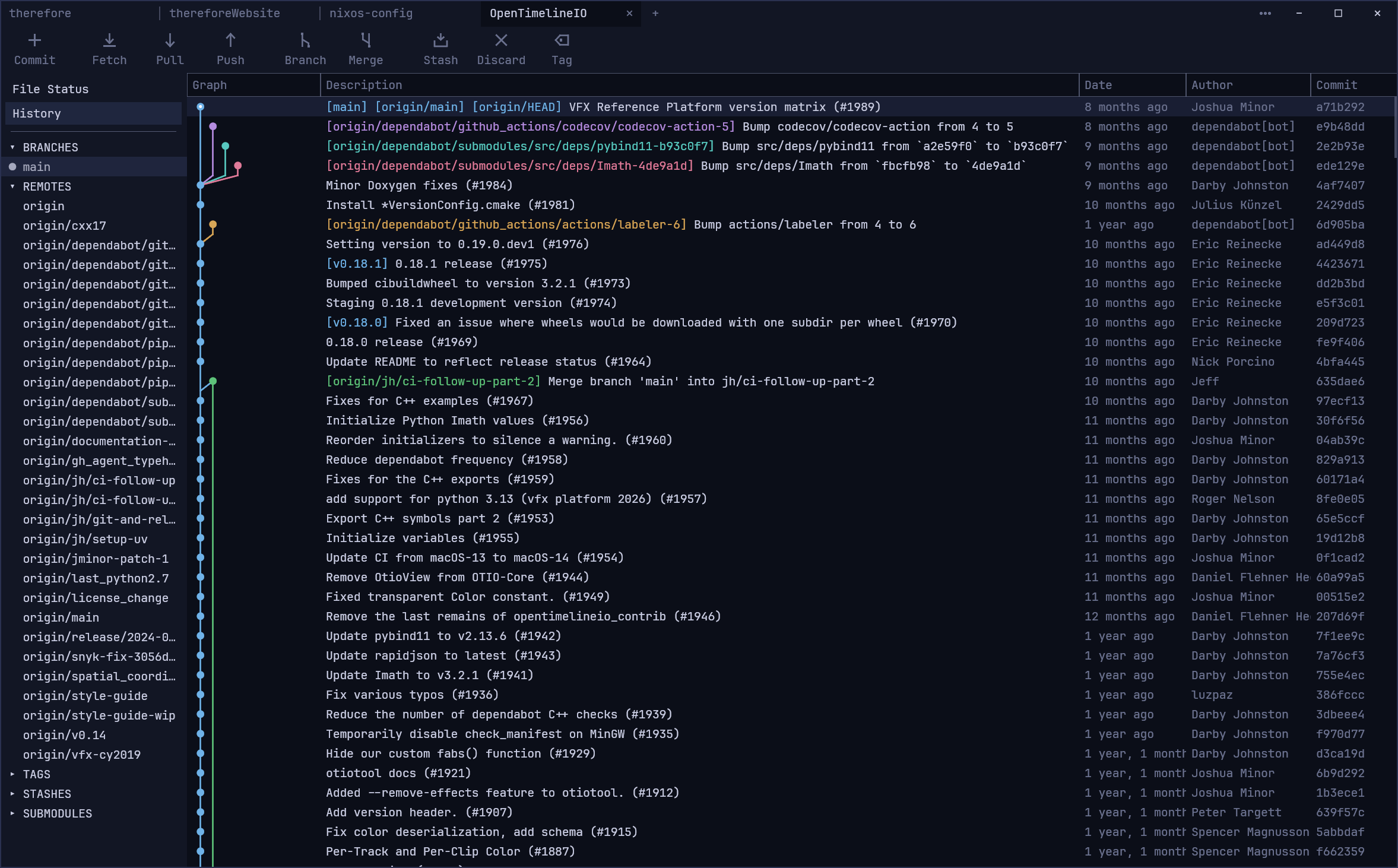
Columns (graph, description, date, author) drag to resize. Double-click a
commit to check it out - its branch if exactly one points at it, otherwise the commit
itself. git_history_all_branches = false narrows the view to the current branch.
04File Status & committing
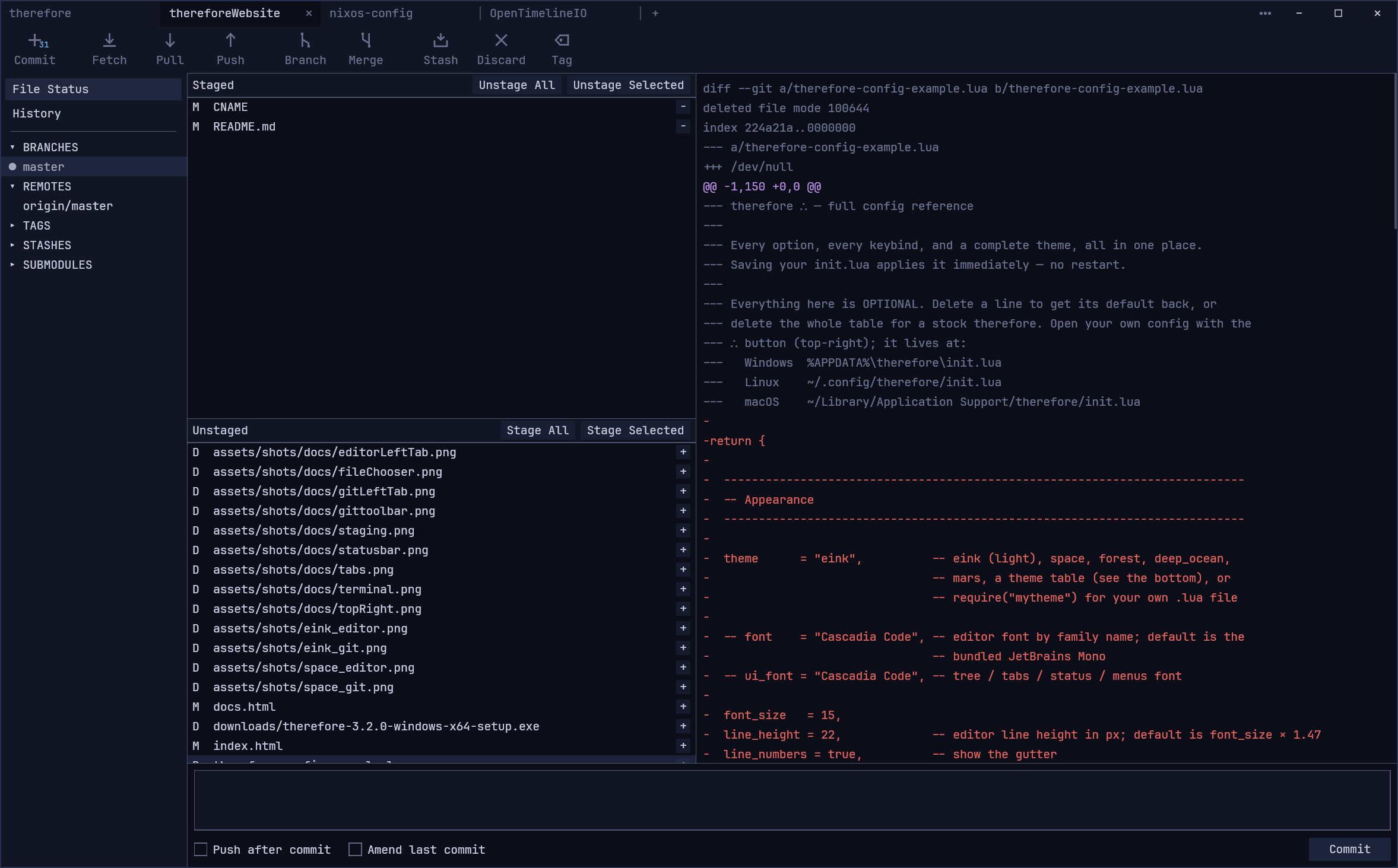
- Each row's
+/-stages or unstages it; the pane buttons do all files or the selection. Select several with Shift for a range and Ctrl to toggle one; Ctrl+A selects the whole pane. - Write the message underneath and commit with the button or Ctrl+Enter.
- Right-click a file to stage, unstage or discard it, open it in its default app, show it in Explorer, or copy its path.
- Conflicts - conflicted files during a merge are coloured to stand out and stay unstaged until you resolve them.
05The toolbar & merging

Commit takes you to File Status; the rest do what they say. The running action and any message from git show at the toolbar's right.
Merge
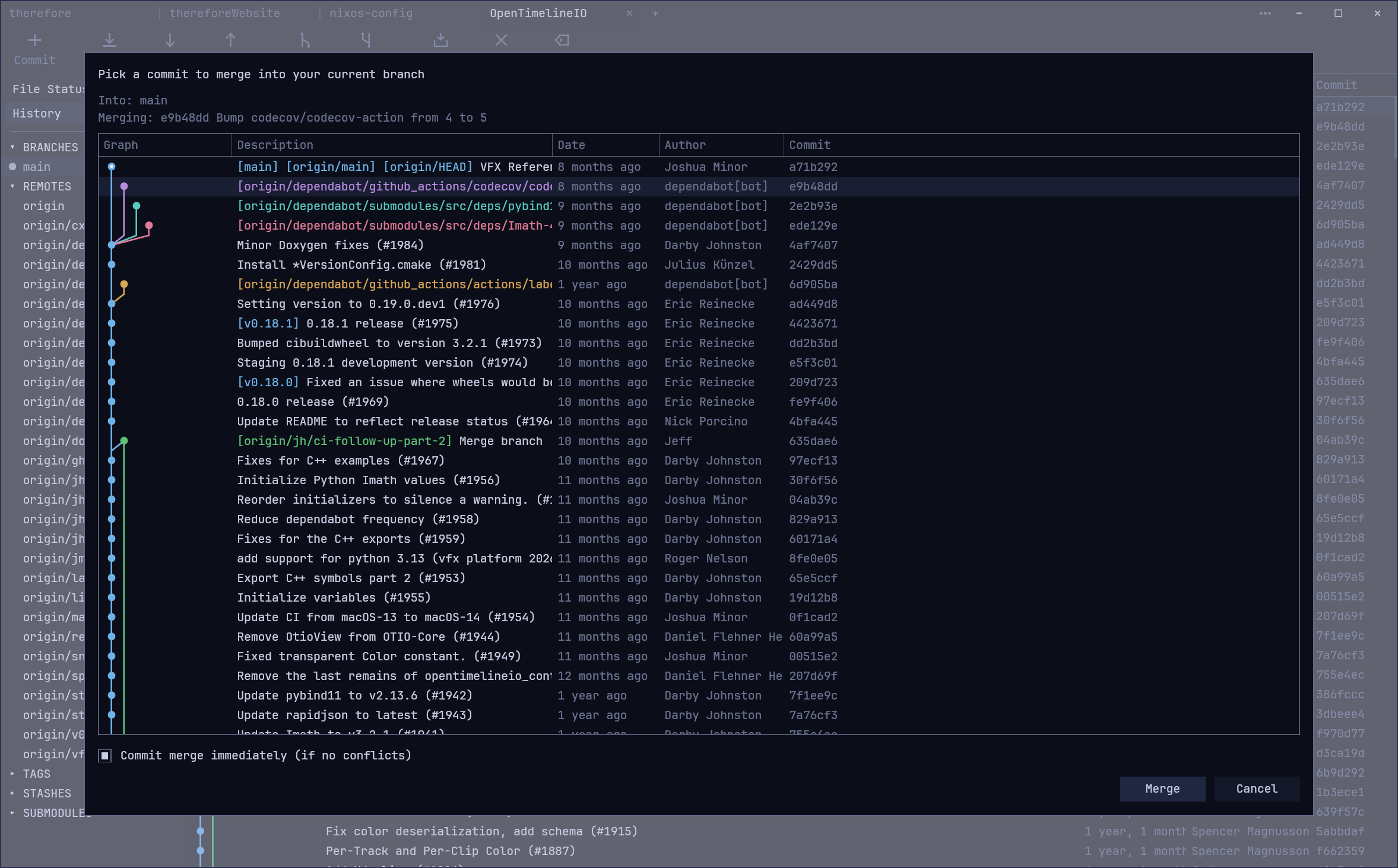
Merge opens a picker - the same history view in a modal - so you pick the commit to merge by selecting its row, or walking it with ↑ / ↓. Commit merge immediately (if no conflicts) does the obvious thing; on conflict the window takes you to File Status to resolve them.
06The sidebar
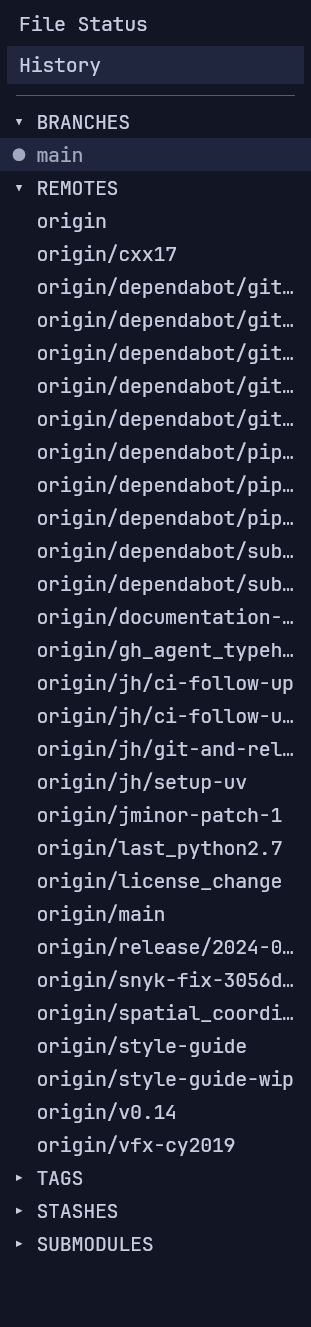
Branches, remotes, tags, stashes and submodules.
- Click a ref to find it in the history.
- Double-click a branch to check it out, a stash to apply it, or a submodule to open it in a tab of its own.
- Right-click for the rest: rename, merge into current, delete (always confirmed).
07Configuration & init.lua
Click the logo in the title bar to open your init.lua in the
config editor - it's created from a template on first open. It's a small window with line
numbers and Lua syntax highlighting, and nothing else. Ctrl+S saves
and applies it immediately: theme, font and keybinds update in real time, and the strip
along the bottom says so, or shows the Lua error if it didn't load. Closing it with unsaved
changes asks first.
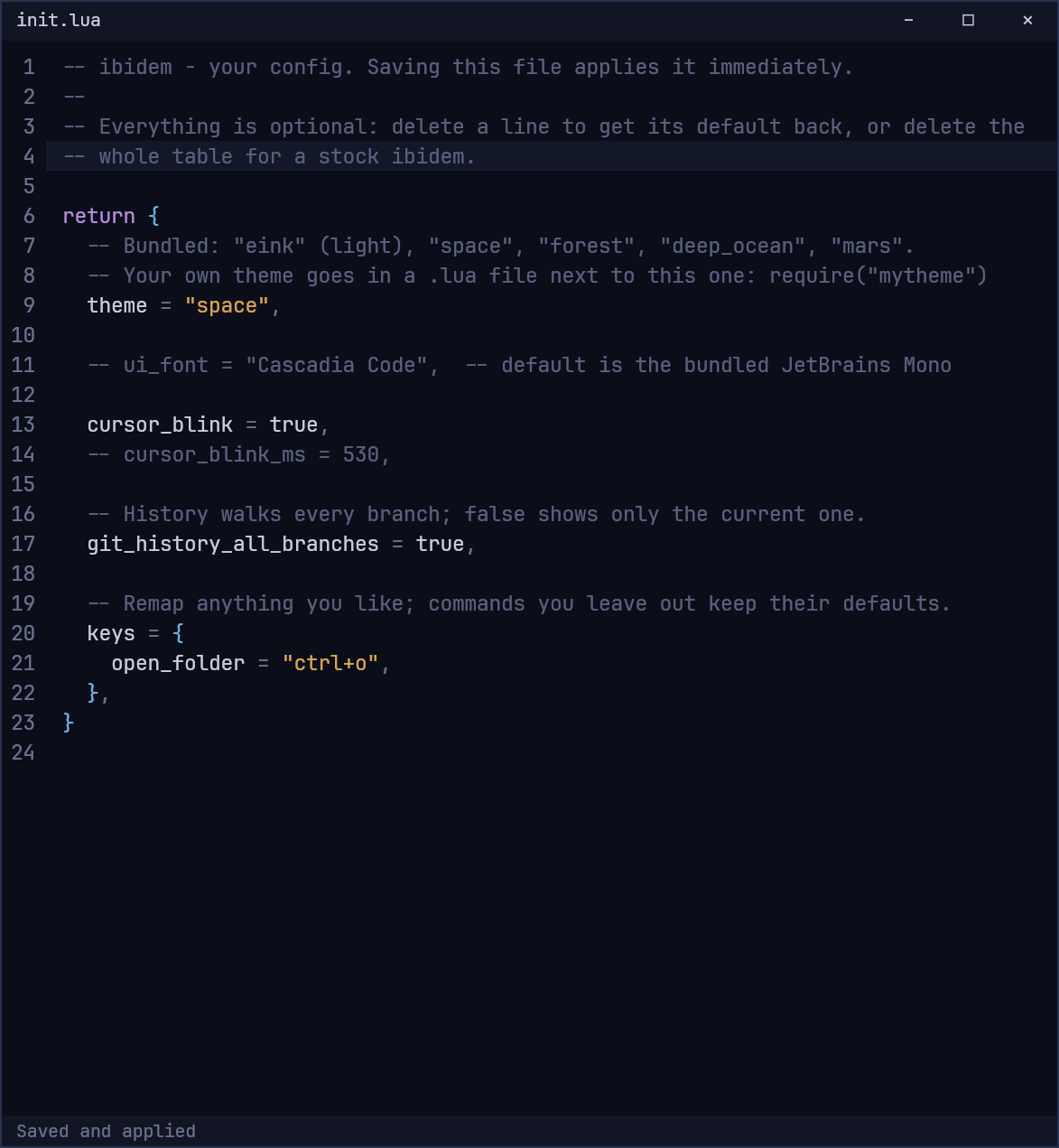
Editing the file in another program works too: ibidem notices it being saved and applies it
the same way. It lives at <config-dir>/ibidem/init.lua:
| OS | Path |
|---|---|
| Windows | %APPDATA%\ibidem\init.lua |
| Linux | ~/.config/ibidem/init.lua |
| macOS | ~/Library/Application Support/ibidem/init.lua |
The script returns a table; everything in it is optional. A bad config is reported and falls back to defaults - it won't stop the app starting. A minimal example:
-- ibidem - your config. Ctrl+S saves it and applies it immediately.
return {
  theme = "eink",   -- eink, space, forest, deep_ocean, mars, or your own
  git_history_all_branches = true,
  restore_tabs = true,

  -- ui_font = "Cascadia Code",  -- default is the bundled JetBrains Mono

  keys = {
    open_folder = "ctrl+o",
  },
}
Your config dir is on Lua's package.path and config_dir holds the
path, so you can split things across files:
theme = require("mytheme")            -- <config>/mytheme.lua
local keys = dofile(config_dir .. "/keys.lua")08All config options
Every top-level key you can put in the returned table. Leave one out to get its default.
| Option | Default | What it does |
|---|---|---|
theme | "eink" | a bundled name, a table, or require("yours") |
ui_font | JetBrains Mono | the font, by family name |
cursor_blink | true | false = solid caret |
cursor_blink_ms | 530 | blink half-period |
git_history_all_branches | true | false = current branch only |
tab_bar_width | 180 | width of each repo tab, px |
tab_bar_height | 30 | height of the title bar the tabs sit in, px |
tab_reorder | true | drag tabs to reorder |
animations | true | tabs slide into place |
restore_tabs | true | reopen last session's tabs at launch |
keys | see below | remap command chords |
09Keybindings
Every command, with its default chord. Override any subset in keys = { ... }; the
rest keep theirs.
keys = {
  open_folder = "ctrl+o",  close_tab = "ctrl+w",
  select_all = "ctrl+a",   copy = "ctrl+c",
  cut = "ctrl+x",          paste = "ctrl+v",
  save = "ctrl+s",         -- the config editor
  undo = "ctrl+z",         redo = "ctrl+y",  -- ctrl+shift+z also redoes
}
Everything else
| Key | Action |
|---|---|
| Ctrl+O | open a folder in a new tab |
| Ctrl+W | close the tab |
| Ctrl+Tab / Ctrl+Shift+Tab | next / previous tab |
| Ctrl+S | save and apply (config editor) |
| Ctrl+Z / Ctrl+Y (or Ctrl+Shift+Z) | undo / redo (config editor) |
| Ctrl+Enter | commit (in the message box) |
| Ctrl+A / C / X / V | select all / copy / cut / paste in a text box; Ctrl+A in File Status selects the pane |
| Enter / Esc | confirm / cancel a dialog (Esc also closes a menu) |
| ↑ / ↓ | walk the Merge picker |
| double-click | check out a commit or branch, apply a stash, open a submodule |
| middle-click a tab | close it |
cmd is accepted as
a synonym for ctrl.10Themes
Bundled: eink (soft charcoal-on-paper, the default), plus the dark
space, forest, deep_ocean and mars. Pick one
by name, or write your own. A theme is a table - base picks a bundled theme to start
from, and you override only what you want; the rest is inherited. Colours are
#rrggbb or #rgb.
theme = {
  name = "midnight",
  base = "space",
  bg = "#0f1115",
  fg = "#d6d9df",
}
Put your theme in a .lua file next to init.lua and load it with
theme = require("mytheme"). Every field:
| Field | Controls |
|---|---|
bg fg sel dim panel | base surfaces and text |
border border_width | window border; width 0 hides it |
cur_line | the config editor's current-line background |
keyword function type string comment number | the config editor's syntax colours |
head_dot git_badge | HEAD marker, toolbar count badges |
diff_add diff_removed diff_hunk | the File Status diff |
conflict | conflicted files during a merge |
graph_colors | commit-graph lane palette (cycled) |
graph_lane_width graph_line_width graph_node_scale | graph geometry |
function is a Lua keyword, so write it as
["function"] = "#7fd6c2". The full example
config has a complete theme with every field filled in.